All Settings
Complete reference for every Strimma setting.
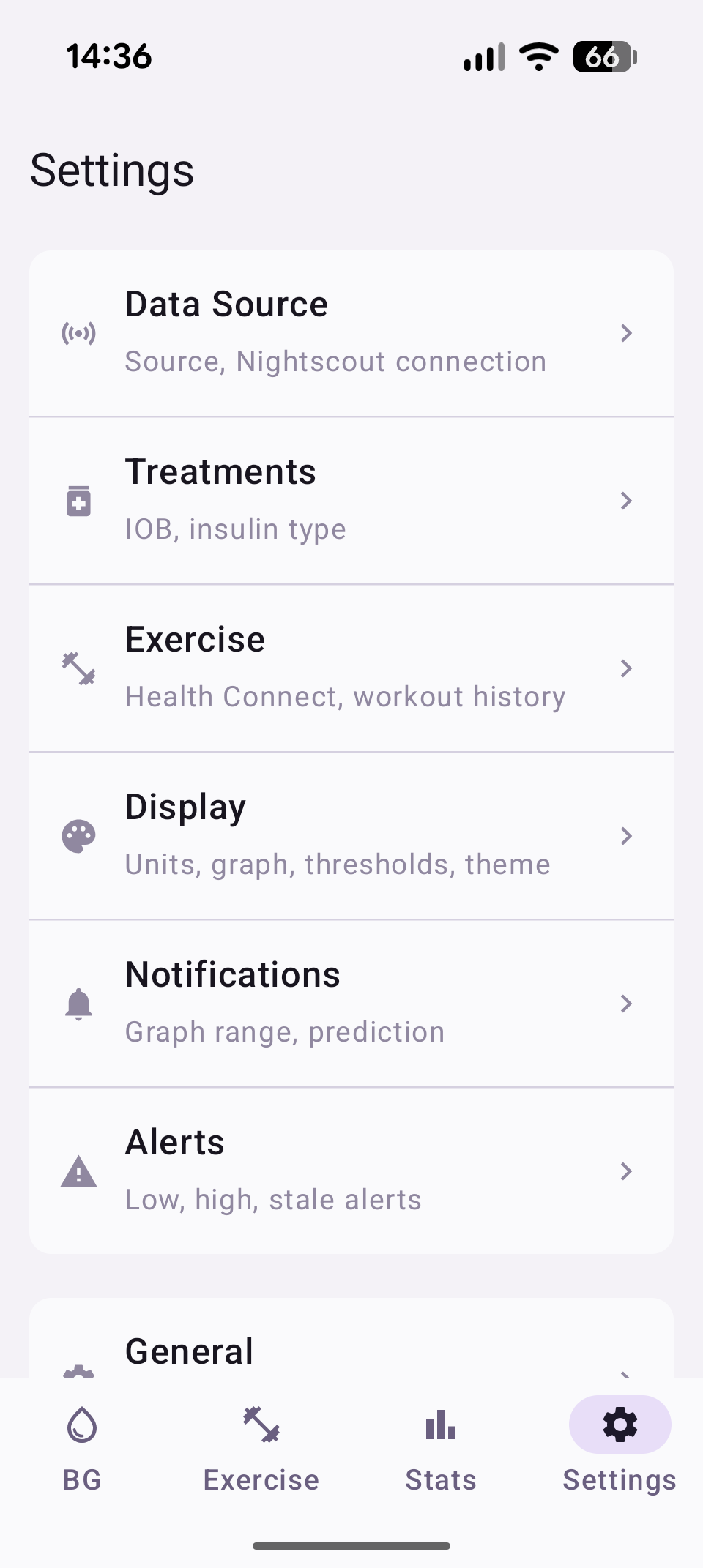
Settings Menu
The settings screen has three groups:
- Configuration: Data Source, Treatments, Exercise, Display, Notifications, Alerts
- Analysis: Statistics
- Tools: General, Sharing, Debug Log
Data Source
Choose how Strimma receives glucose data and configure Nightscout.
| Setting | Description | Default |
|---|---|---|
| Source | How glucose data arrives — Companion, xDrip Broadcast, or Nightscout Follower | Companion |
| Nightscout URL | Base URL for pushing readings (e.g., https://my-ns.fly.dev) | Empty |
| API Secret | Nightscout API secret (stored encrypted) | Empty |
| Follower URL | Nightscout URL to follow (only in Follower mode) | Empty |
| Follower Secret | API secret for the followed server | Empty |
| Poll Interval | How often to check for new readings in Follower mode (30–300 seconds) | 60s |
Nightscout Pull (Readings)
| Action | Description |
|---|---|
| Pull 7 days | Backfill 7 days of readings from Nightscout |
| Pull 14 days | Backfill 14 days |
| Pull 30 days | Backfill 30 days |
Auto-pull
When Strimma's database is empty (first install), it automatically pulls 30 days of history from Nightscout if a URL and secret are configured.
See Data Sources for details on each mode.
Treatments
Configure treatment sync and insulin parameters for IOB calculation.
| Setting | Description | Default |
|---|---|---|
| Treatment sync | Fetch bolus, carb, and basal data from Nightscout | Off |
| Insulin type | Insulin curve for IOB calculation | Fiasp |
| Custom DIA | Duration of Insulin Action in hours (only for Custom insulin) | 5.0h |
Nightscout Pull (Treatments)
When treatment sync is enabled:
| Action | Description |
|---|---|
| Pull 7 days | Backfill 7 days of treatments from Nightscout |
| Pull 14 days | Backfill 14 days |
| Pull 30 days | Backfill 30 days |
Meal Time Slots
Configure when Breakfast, Lunch, and Dinner windows start and end. Meals outside these windows are classified as Snack.
| Setting | Default |
|---|---|
| Breakfast | 06:00–10:00 |
| Lunch | 11:30–14:30 |
| Dinner | 17:00–21:00 |
See Treatments & IOB for details.
Display
Configure units, graph window, thresholds, and theme.
| Setting | Description | Default |
|---|---|---|
| Unit | Display unit — mmol/L or mg/dL | mmol/L |
| Graph window | Main graph time range (1–8 hours) | 4 hours |
| BG Low | Low threshold for graph coloring and TIR | 4.0 mmol/L (72 mg/dL) |
| BG High | High threshold for graph coloring and TIR | 10.0 mmol/L (180 mg/dL) |
| Theme | App appearance — Light, Dark, or System | System |
Notifications
Configure the notification graph and prediction window.
| Setting | Description | Default |
|---|---|---|
| Graph time range | Time shown in notification graph (30m, 1h, 2h, 3h) | 1 hour |
| Prediction window | How far ahead to predict (Off, 15 min, 30 min) | 15 min |
Alerts
Configure glucose alerts. Each alert has an enable toggle and a threshold value.
| Setting | Description | Default |
|---|---|---|
| Urgent Low | Alert for dangerously low glucose | Enabled, 3.0 mmol/L (54 mg/dL) |
| Low | Alert for low glucose | Enabled, 4.0 mmol/L (72 mg/dL) |
| High | Alert for high glucose | Enabled, 10.0 mmol/L (180 mg/dL) |
| Urgent High | Alert for dangerously high glucose | Enabled, 13.0 mmol/L (234 mg/dL) |
| Low Soon | Alert when predicted to go low | Enabled |
| High Soon | Alert when predicted to go high | Enabled |
| Stale Data | Alert when no reading for 10+ minutes | Enabled |
Each alert also has a Sound button that opens the Android notification channel settings for customization.
See Alerts for full details.
Exercise
Configure Health Connect integration, workout calendar, and pre-activity guidance.
Health Connect
| Setting | Description | Default |
|---|---|---|
| Health Connect sync | Read exercise sessions from Health Connect | Off |
| Write glucose | Write CGM readings to Health Connect | Off |
| Max heart rate | Used for intensity detection on completed sessions | 190 BPM |
Workout Calendar
| Setting | Description | Default |
|---|---|---|
| Calendar | Which Android calendar to monitor for workouts | None |
| Lookahead | How far ahead to scan for upcoming workouts | 3 hours |
| Guidance trigger | When the pre-activity card appears on main screen | 120 min before |
Category Target Ranges
Each exercise category (Running, Cycling, Strength, etc.) has a configurable low and high BG threshold. Defaults come from the category's metabolic profile (Aerobic, Resistance, or High-Intensity).
See Exercise for details.
Statistics
Opens the Statistics screen with Metrics, AGP, and Meals tabs.
General
Startup behavior, language, battery, and version info.
| Setting | Description | Default |
|---|---|---|
| Start on boot | Automatically start Strimma when the phone restarts | On |
| Battery optimization | Shows whether Strimma is exempt from battery optimization | — |
| Language | App language — System, English, Svenska, Deutsch, Español, Français | System |
| Version | Current app version | — |
Sharing
Integrations and backup.
Integration
| Setting | Description | Default |
|---|---|---|
| BG Broadcast | Send xDrip-compatible broadcast intent | Off |
| Local Web Server | Serve BG on port 17580 for watches and apps | Off |
| Web Server API Secret | Secret for authenticating web server requests | Empty |
Backup
| Action | Description |
|---|---|
| Export Settings | Save all settings to a JSON file |
| Import Settings | Restore settings from a previously exported file |
Export contains secrets
The exported settings file includes your Nightscout URL and API secret in plain text. Handle the file securely.
Debug Log
Opens the Debug Screen showing real-time and file-based logs. Useful for troubleshooting issues with data reception.