Exercise & Health Connect
Strimma integrates with Health Connect to read exercise sessions and write glucose readings. Exercise data flows from fitness apps (Garmin Connect, Samsung Health, Google Fit, etc.) through Health Connect into Strimma.
What You Get
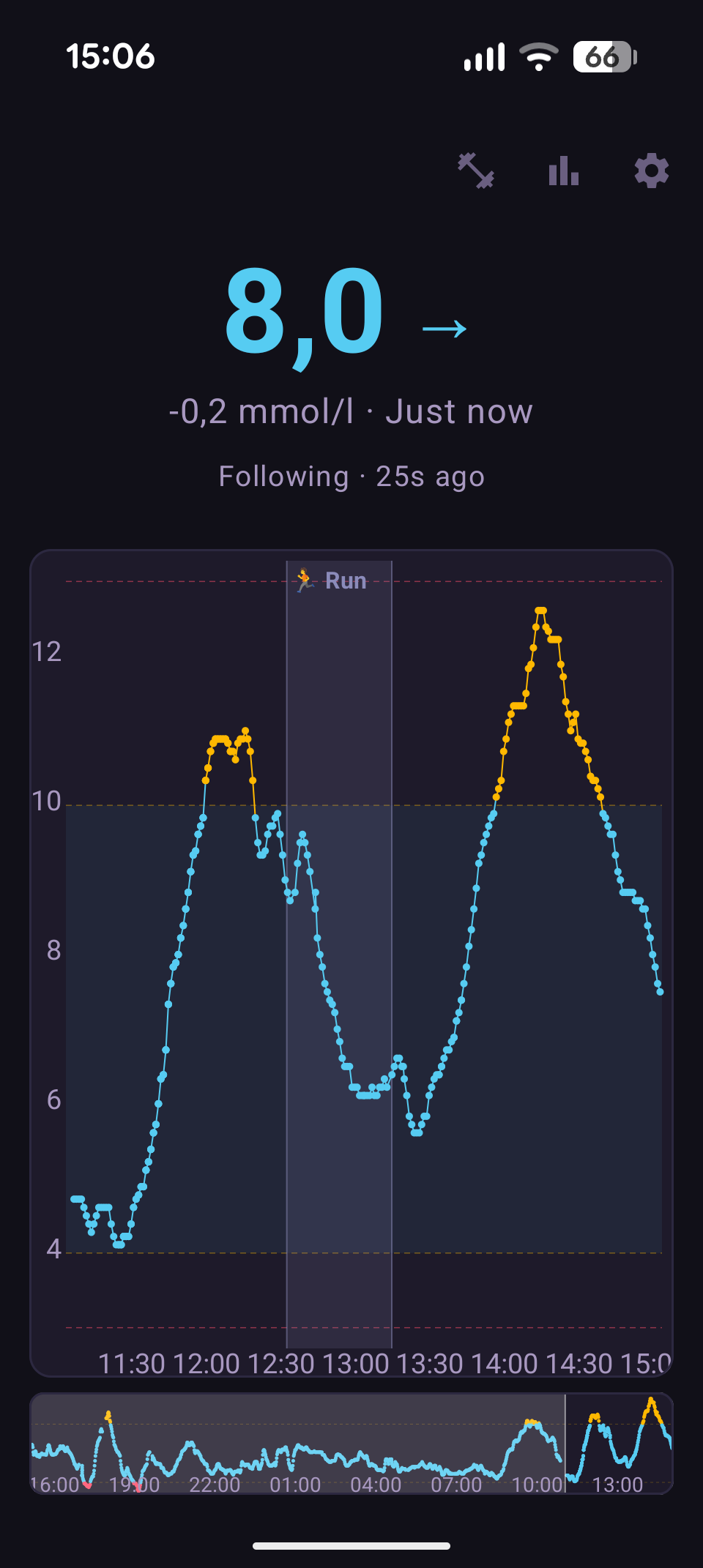
Exercise Bands on the Glucose Graph
When you exercise, Strimma overlays a shaded band on the glucose graph showing when the session happened. This makes it easy to see how exercise affects your glucose at a glance.
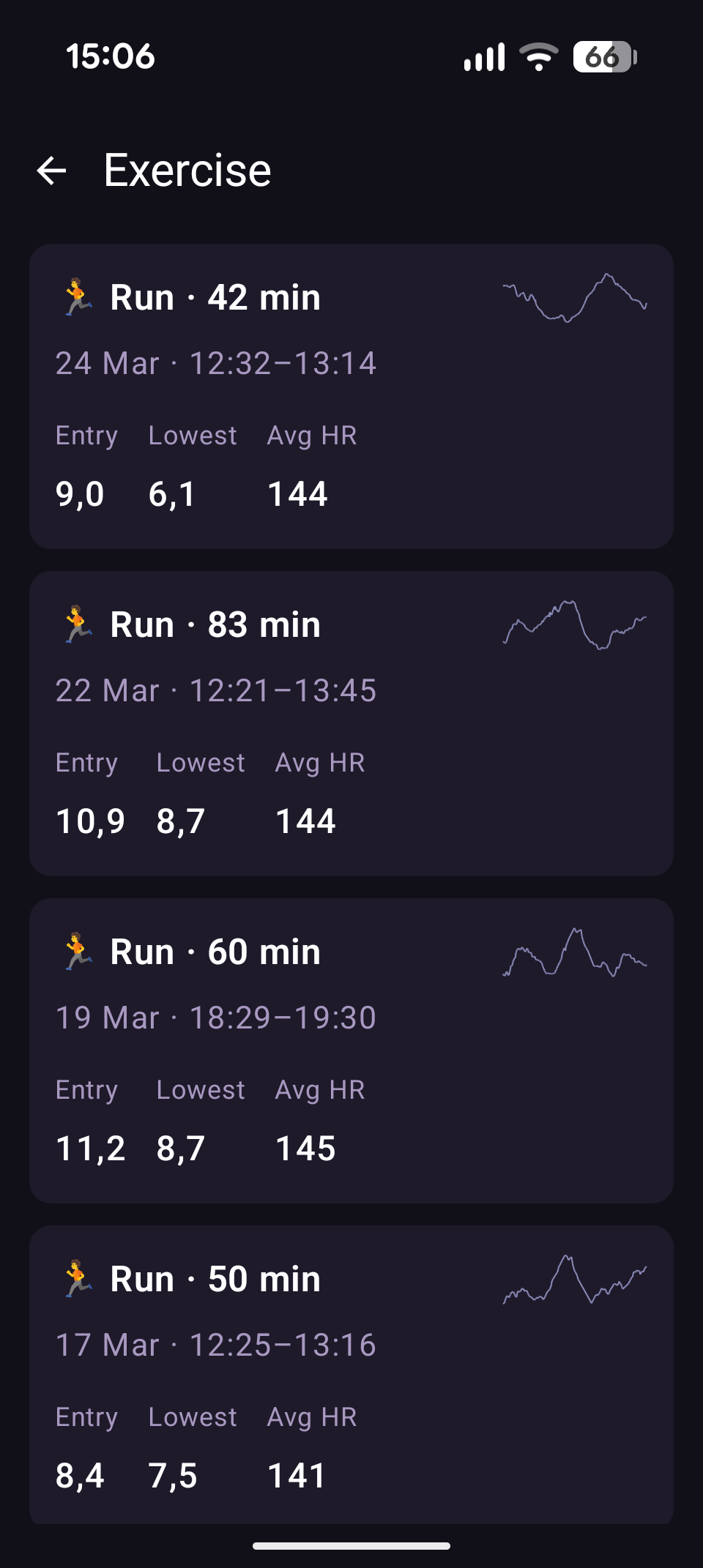
Exercise History
The exercise history screen shows all your recent sessions with key BG stats: entry glucose, lowest during the session, and average heart rate. Each card includes a BG sparkline showing the glucose trajectory.
Exercise Detail
Tap any session to see the full before/during/after BG analysis:
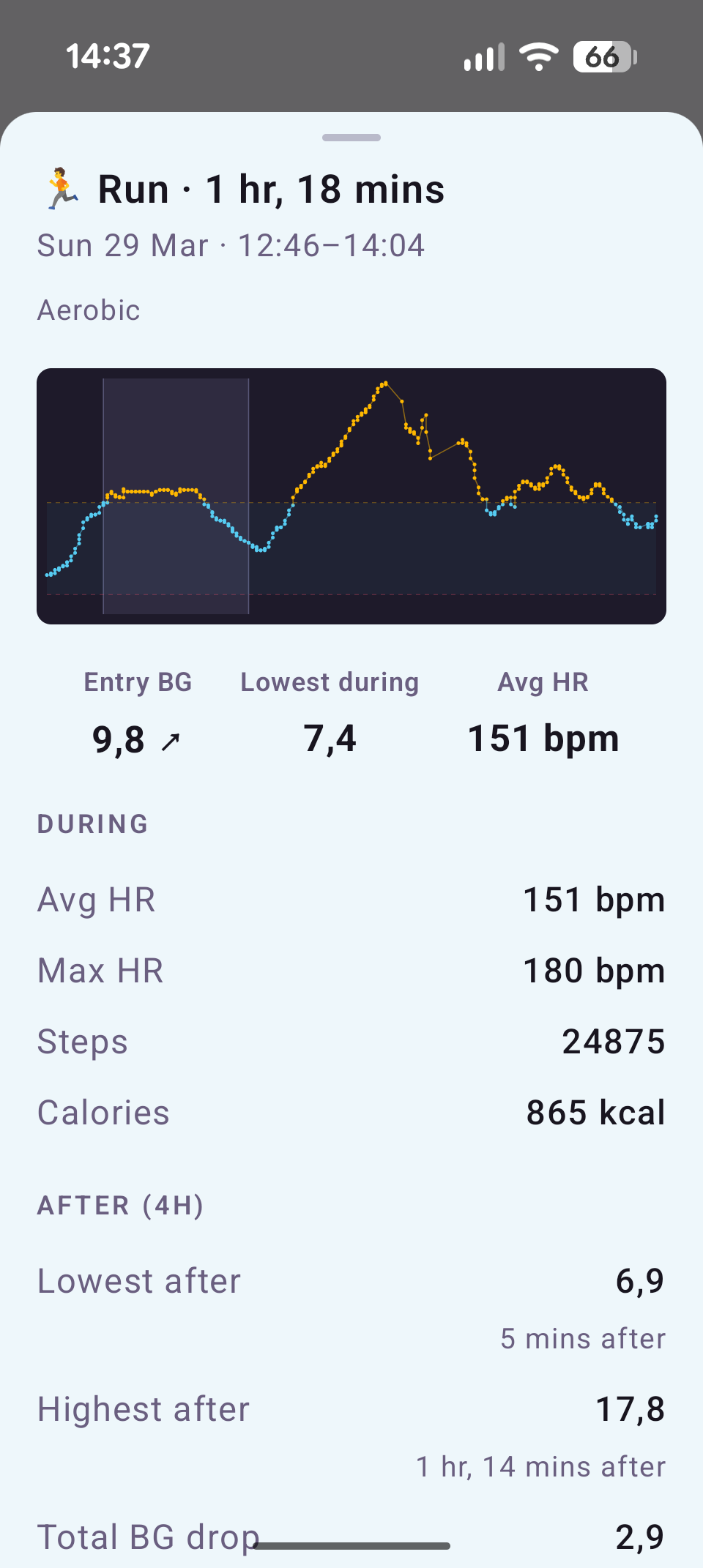
Before — Entry BG and trend arrow (rising/falling/stable) from the 30 minutes before exercise started.
During — Minimum BG, maximum drop rate per 10 minutes, average and max HR, steps, and calories.
After (4 hours post-exercise) — Post-exercise lowest and highest with timing, total drop from entry to overall lowest, and a post-exercise hypo flag if glucose went below your low threshold.
Exercise Stats
The exercise stats screen shows aggregate BG patterns across your sessions, grouped by activity type (Running, Cycling, Strength, etc.) and metabolic profile:
| Metabolic Profile | Activities | Default Target Range |
|---|---|---|
| Aerobic | Running, Walking, Hiking, Cycling, Swimming, Yoga, Rowing, Skiing | 7–10 mmol/L (126–180 mg/dL) |
| Resistance | Strength, Climbing | 7–10 mmol/L (126–180 mg/dL) |
| High-Intensity | Martial Arts, or any session with "interval"/"tempo"/"hiit"/"sprint" in the title | 8–12 mmol/L (144–216 mg/dL) |
For each category (minimum 3 sessions), you see:
- Session count and average duration
- Average entry BG — are you starting high enough?
- Average min BG and drop rate (per 10 min) — how fast does your glucose fall?
- Hypo rate — percentage of sessions where glucose dipped below your low threshold
- Post-exercise lows — delayed hypos that occur after the session ends
Stats are further broken down by entry BG bands (below low, low–7.0, 7.0–10.0, above 10.0) so you can see how your starting glucose affects the outcome.
Intensity detection works two ways: from keywords in calendar event titles (for planned workouts) or from actual heart rate data (if average HR ≥ 80% of your configured max HR → High-Intensity).
Pre-Activity Guidance
When you have a workout coming up (read from your Android calendar), Strimma shows a readiness card on the main screen:
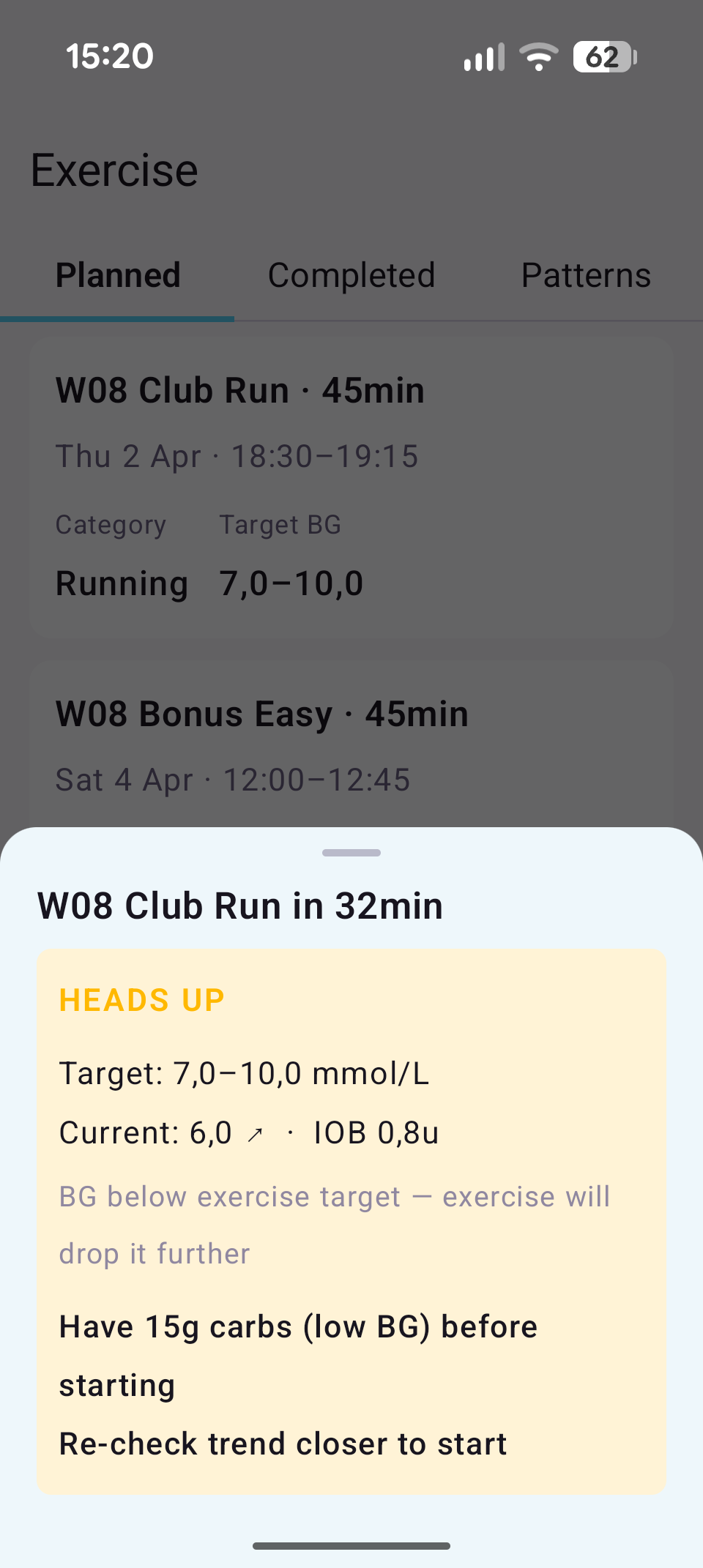
Status levels:
| Status | Meaning |
|---|---|
| Ready | BG is in range, trend is stable, IOB is manageable — you're good to go |
| Heads Up | One concern (e.g., BG dropping, predicted to go low, high BG) — you can start but be aware |
| Hold On | Multiple risk factors — eat carbs and wait before starting |
What it evaluates:
- Current BG and trend (rising/falling/stable)
- IOB (insulin on board) — each unit of IOB adds ~12g to the carb recommendation
- 30-minute glucose forecast
- Compound risk detection — BG below 8.0 mmol AND falling fast. This combination is dangerous before exercise.
Carb recommendations:
When carbs are needed, the card shows a specific amount (rounded to 5g, max 60g) adjusted for your IOB and current BG. Timing suggestions vary based on how soon the workout starts: "immediately" (<15 min), "now" (<45 min), or "~30 minutes before start."
Workout Schedule
Strimma reads planned workouts from your Android calendar and shows them on the Exercise screen's Planned tab. Each upcoming workout shows:
- Event title, time, and detected activity type
- Pre-activity status (Ready/Heads Up/Hold On) based on current glucose conditions
- Metabolic profile (Aerobic/Resistance/High-Intensity) — detected from the event title
Use a workout-only calendar
Strimma treats every event in the connected calendar as an exercise session. If you connect your main calendar, non-workout events (meetings, appointments, etc.) will show up as planned workouts with readiness cards and carb recommendations. Create a separate calendar for workouts only.
Activity type detection:
Strimma detects the activity type from the event title using keyword matching. The following keywords are recognized (case-insensitive):
| Activity | Keywords |
|---|---|
| Running | run, running, jog, jogging, sprint, sprinting, 5k, 10k, half marathon, marathon, parkrun, trail run, treadmill, track run, track workout, löpning, löp, jogga, lopp, lauftraining, laufen, course, courir, correr, corrida, carrera |
| Walking | walk, walking, stroll, hike-walk, promenad, promenera, spazier, spaziergang, marche, caminar, caminata |
| Hiking | hike, hiking, trek, trekking, backpack, vandring, vandra, bergwandern, wandern, randonnée, senderismo, excursión |
| Cycling | bike, biking, cycle, cycling, bicycle, spinning, spin class, zwift, peloton, velodrome, criterium, crit ride, cykel, cykl, radfahren, radtour, vélo, cyclisme, ciclismo, bicicleta |
| Swimming | swim, swimming, pool swim, open water, triathlon swim, simning, simma, simträning, schwimmen, natation, nager, nadar, natación |
| Strength | gym, strength, weights, weightlifting, powerlifting, deadlift, squat, bench press, barbell, dumbbell, kettlebell, crossfit, calisthenics, bodyweight, resistance, lift, lifting, styrk, styrketräning, vikter, krafttraining, musculation, musculación, pesas |
| Yoga | yoga, pilates, stretch, stretching, flexibility, mobility, vinyasa, ashtanga, bikram, yin yoga, hatha, tai chi, qigong, rörlighet, dehnen, étirement, estiramiento |
| Rowing | rowing, row machine, ergometer, concept2, c2, kayak, canoe, paddling, paddle, rodd, roddmaskin, paddla, rudern, aviron, remo |
| Skiing | ski, skiing, snowboard, snowboarding, cross-country, xc ski, langlauf, downhill, slalom, skid, skidor, längdskid, utför, esquí, esquiar |
| Climbing | climb, climbing, boulder, bouldering, top rope, lead climb, rock climbing, wall climbing, klättr, klättring, klettern, escalade, escalada |
| Martial Arts | martial, boxing, kickboxing, muay thai, mma, karate, taekwondo, judo, jiu-jitsu, jiu jitsu, jiujitsu, bjj, wrestling, krav maga, capoeira, kung fu, fencing, sparring, self-defense, self defense, kampsport, brottning, boxning, kampfsport, boxen, arts martiaux, boxe, lutte, artes marciales, lucha |
Events that don't match any keyword are categorized as Other with the default Aerobic metabolic profile. Use a recognized keyword in the event title for correct categorization.
Intensity keywords ("interval", "tempo", "hiit", "sprint") in the title override the metabolic profile to High-Intensity, regardless of activity type.
Settings:
- Calendar — select which calendar to monitor (use a workout-only calendar)
- Lookahead — how far ahead to scan (1–6 hours, default 3h)
- Guidance trigger — when the readiness card appears on the main screen (30–240 min before workout, default 120 min)
Glucose Write
Optionally, Strimma can write your glucose readings to Health Connect so other health apps can see your CGM data.
Setup
1. Open Exercise Settings
In Strimma, go to Settings (gear icon) > Exercise.
2. Grant Health Connect Permissions
Tap Permissions needed to grant Strimma access to read exercise data and write glucose. You'll see the Health Connect permission dialog listing the specific data types.
3. Enable Write (Optional)
Toggle Write glucose to Health Connect if you want your CGM readings visible to other apps via Health Connect.
4. Check Status
The status indicator shows:
- Connected (green) — permissions granted, sync running
- Permissions needed (amber) — tap to grant
- Not installed (grey) — Health Connect not available on your device
How It Works
Health Connect is built into Android 14 and later. On Android 13, it's available as a separate app from Google Play.
Strimma syncs exercise sessions every 15 minutes using Health Connect's changes API (delta sync). On the first sync, it fetches the last 30 days of exercise data.
Data Read from Health Connect
| Data Type | Used For |
|---|---|
| Exercise sessions | Session type, duration, start/end time |
| Heart rate | Average and max HR during exercise |
| Steps | Total steps during exercise |
| Active calories | Calories burned during exercise |
Data Written to Health Connect
| Data Type | Source |
|---|---|
| Blood glucose | CGM readings from Strimma (interstitial fluid) |
Supported Exercise Sources
Any app that writes exercise sessions to Health Connect works with Strimma:
- Garmin Connect — syncs automatically from Garmin watches
- Samsung Health — syncs from Galaxy Watch
- Google Fit — manual or tracked workouts
- Strava — synced activities
- Any other Health Connect-compatible app
BG Analysis Explained
The exercise-BG analysis helps you learn how exercise affects your glucose, so you can prepare better for future sessions.
Entry BG + Trend
Your glucose and its trend (rising/falling/stable) at the moment exercise started. This helps answer: "Should I have eaten more before starting?"
Min BG (During)
The lowest glucose reading during the exercise session. This is the safety floor — if it drops below your low threshold, you may need more fuel or less insulin on board.
Max Drop Rate
The fastest rate of glucose decline during exercise, measured per 10-minute bucket. High drop rates mean you're burning through glucose fast and may need mid-exercise carbs.
Post-Exercise Lowest + Time to Lowest
The lowest glucose in the 4 hours after exercise ends, and when it happened. Delayed post-exercise lows are common in T1D — glucose can crash hours after a run due to increased insulin sensitivity and muscle glycogen replenishment.
Post-Exercise Highest + Time to Highest
The highest glucose in the 4 hours after exercise ends. Post-exercise spikes (from adrenaline, liver glucose dump, or over-correction of a low) are common and can trigger an insulin correction that leads to a delayed crash.
Total Drop
The difference between your entry BG and the overall lowest point (during or after exercise). This single number captures the total BG impact of the session: "This run cost me 7.0 mmol — next time I need more carbs or less IOB."
Post-Exercise Hypo
Flagged when post-exercise glucose drops below your configured low threshold. This is the key safety outcome to track.