Alerts
Strimma can alert you with sound and vibration when your glucose crosses configurable thresholds.
Alert Types
Strimma has eight alert types, each with its own Android notification channel so you can customize the sound and vibration for each one independently. Regular and Exercise protocols share the corresponding channels.
Glucose Threshold Alerts
| Alert | Default Threshold | Bypasses Do Not Disturb | Vibration |
|---|---|---|---|
| Urgent Low | 3.0 mmol/L (54 mg/dL) | Yes | Strong, repeated |
| Low | 4.0 mmol/L (72 mg/dL) | No | Medium |
| High | 10.0 mmol/L (180 mg/dL) | No | Short |
| Urgent High | 13.0 mmol/L (234 mg/dL) | Yes | Strong, repeated |
Predictive Alerts
| Alert | Trigger | Bypasses DND | Vibration |
|---|---|---|---|
| Low Soon | Predicted to cross low threshold within prediction window | No | Gentle |
| High Soon | Predicted to cross high threshold within prediction window | No | Gentle |
System Alerts
| Alert | Trigger | Bypasses DND | Vibration |
|---|---|---|---|
| Stale Data | No reading received for 10+ minutes. Uses the selected protocol's toggle; suppressed during the first 30 minutes of Workout Mode. See Workout Mode. | No | Gentle |
| Push Failed | Nightscout push failed after retries | No | Gentle |
Workout-Mode Behavior
When workout mode is on (see Workout Mode):
- The Exercise protocol is selected instead of the Regular protocol. Its independent enablement toggles, thresholds, predictive toggles, and stale toggle apply (defaults: 5.0 / 6.0 / 14.0 / 16.0 mmol/L).
- Exercise Low and Exercise High also become the in-range bounds for graphs and other live displays while Workout Mode is on.
- Alert titles are prefixed with
Workout ·(e.g.,Workout · Urgent Low) so the severity label is unambiguous — without this, an "Urgent Low" at 5.0 mmol/L could be misread as a normal-life crisis. - Stale-data alerts use the selected protocol's toggle. They are suppressed for the first 30 minutes of Workout Mode, then use the normal 10+ minute rule.
Priority Logic
Alerts follow a priority system to avoid duplicate noise:
- Urgent Low takes priority over Low. If your glucose triggers both, only Urgent Low fires. When it rises above the urgent threshold, Urgent Low clears and Low can fire if still below the low threshold.
- Urgent High takes priority over High. Same logic — only the more severe alert fires.
- Predictive alerts only fire when in range. If you're already low, "Low Soon" won't fire — you already know.
Snooze
When an alert fires, the notification includes a Snooze button (label shows the configured duration, e.g. Snooze 30m). Tapping it silences that alert and any less severe alerts in the same category for the Alert Snooze Duration set in Settings > Alerts.
| Option | Effect |
|---|---|
| 15m / 30m / 1h / 2h / 3h | Silence window for the alert Snooze button |
| Default | 30m |
This setting is independent of Settings > Notifications → Action Button → Duration (that control pauses ALL / High / Low from the foreground notification).
- Snoozing a lower-severity alert does not suppress higher-severity alerts — snoozing Low Soon doesn't affect Low or Urgent Low, and snoozing Low doesn't affect Urgent Low
- After the configured duration, alerts can fire again if the condition persists
- Snooze state is stored locally and survives app restarts
Pause by Category
You can pause entire alert categories for a custom duration — useful during exercise or known post-meal spikes.
| Category | Pauses These Alerts |
|---|---|
| All | Both Low and High categories at once |
| Low | Urgent Low, Low, Low Soon |
| High | Urgent High, High, High Soon |
- Set a custom duration when pausing
- The pause auto-clears when the duration expires
- Pause state survives app restarts
- The All alerts shortcut at the top of the pause sheet sets both Low and High to the same duration in one tap. The header shows a single All alerts paused pill while the two expiries match; cancelling or rescheduling one category from the sheet splits it back into per-category pills
Snooze vs Pause
Snooze silences an alert and any less severe alerts in the same category for the Alert Snooze Duration. Pause silences an entire category (all low alerts or all high alerts) for a duration you choose.
Configuring Alerts
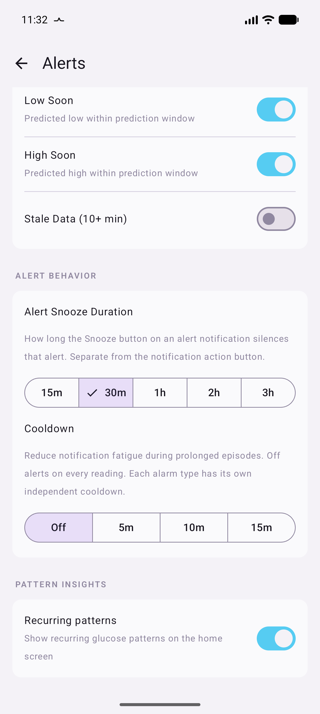
Go to Settings > Alerts. The screen has four sections, with independent Regular and Exercise protocols, one shared behavior section, and a Pattern Insights toggle.
Alerts
This section configures the Regular protocol used outside Workout Mode:
- Each configurable alert has an independent toggle. Disabled alerts never fire, regardless of your glucose level.
- The four glucose threshold alerts (Urgent Low, Low, High, Urgent High) each have an editable threshold in your configured unit (mmol/L or mg/dL).
- Low Soon, High Soon, and Stale Data use the Regular protocol's enablement settings.
Exercise Alerts
This section configures the independent Exercise protocol used while Workout Mode is active. It has its own enablement toggles and threshold values; changing it does not change the Regular protocol. Exercise Low and Exercise High also define the exercise graph range.
Exercise alerts use the same notification channel as their corresponding Regular alert. Exercise rows intentionally have no Sound buttons or separate channel links.
Alert Behavior
Alert Snooze Duration and Cooldown appear once in this shared section and apply to whichever protocol is active. They are not separate Regular and Exercise settings.
Customize Sound
Regular alert rows have a Sound button that opens the Android notification channel settings for that alert. Exercise alert rows intentionally omit Sound buttons because both protocols use the same Android notification channels. From a Regular alert's Sound button you can:
- Choose a different notification sound or alarm tone
- Enable/disable vibration
- Change the vibration pattern
- Override Do Not Disturb settings (for urgent alerts)
Use distinct sounds
Pick clearly different sounds for Low vs High alerts so you know which one it is without looking at your phone. Many users set the urgent alerts to a loud alarm tone and the regular alerts to a gentler notification sound.
Do Not Disturb Bypass
Urgent Low and Urgent High alerts bypass Do Not Disturb mode by default. This is critical for safety — a severe low at 3 AM needs to wake you up.
The other alerts (Low, High, Low Soon, High Soon, Stale Data) respect Do Not Disturb by default. However, you can change any alert to bypass DND:
- Go to Settings > Alerts
- In the Alerts section, tap the Sound button next to the alert you want to change
- In the Android notification channel settings, enable Override Do Not Disturb
This is an Android feature — once you change a channel's DND setting, Android remembers it.
How Alerts Are Triggered
- Strimma receives a new glucose reading
- The reading is checked against each enabled alert's threshold
- If a threshold is crossed and the alert isn't snoozed, the alert fires
- Stale data is checked every 60 seconds independently
Re-alerting
Alerts keep firing as long as the condition persists. Each new glucose reading triggers a check — if you're still low and the alert isn't snoozed, it fires again. This means you'll get alerted on every reading until you either:
- Snooze the alert (silences it for the configured Alert Snooze Duration), or
- Return to range (the condition clears)
If you snooze an alert and you're still out of range when the snooze expires, the alert fires again on the next reading.
This is intentional — a persistent low or high should not be silently ignored.
Cooldown
By default (Cooldown set to Off), alerts fire on every reading while the condition persists. To reduce notification fatigue during prolonged episodes, you can set a Cooldown in the Alerts settings:
| Option | Behavior |
|---|---|
| Off | No cooldown — alerts fire on every reading (sensor rate) |
| 5m | After an alarm fires, that same alarm won't re-fire for 5 minutes |
| 10m | After an alarm fires, that same alarm won't re-fire for 10 minutes |
| 15m | After an alarm fires, that same alarm won't re-fire for 15 minutes |
Per-alarm cooldown
Each alarm type (Urgent Low, Low, High, Urgent High, Low Soon, High Soon) has its own independent cooldown timer. If you set a 15-minute cooldown:
- Low fires at 10:00 → next Low suppressed until 10:15
- Urgent Low at 10:05 → fires immediately (separate alarm, separate timer)
- Low at 10:16 → fires (cooldown expired)
Silent updates during cooldown
While an alarm is in cooldown and its notification is still showing, Strimma updates the notification text with the latest reading (or predicted time) without sound or vibration. If you dismissed the notification, it stays dismissed until the cooldown ends.
Severity changes
Cooldown only applies while the severity stays the same:
- Getting worse (Low Soon → Low → Urgent Low, High Soon → High → Urgent High) always alerts with sound, even during cooldown.
- Getting better (for example Urgent Low → Low) never alerts with sound. The lower-severity notification appears silently.
Snoozing an alert silences it and anything milder, but not worse levels. Pausing alerts from the home screen silences everything it covers, including worse levels.
Cooldown reset
When glucose returns to range, all cooldown timers reset immediately. The next episode alerts right away regardless of remaining cooldown. Low Soon and High Soon reset when the matching Low or High alarm takes over.
Pattern Insights
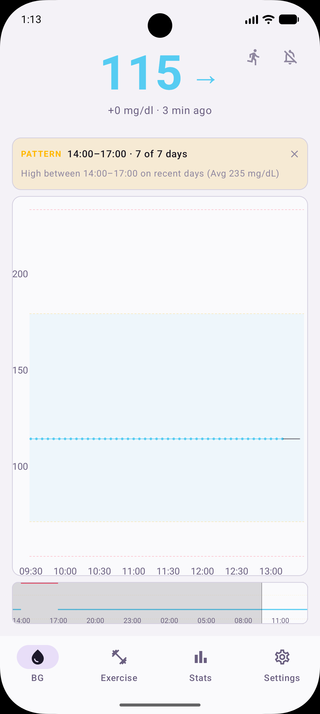
Strimma analyzes your glucose history over the last 7 days to identify recurring patterns at specific times of day (for example, recurring highs between 14:00–16:00, or recurring lows around 06:00).
- Threshold: Requires at least 4 evaluated days out of range during the same 1-hour window, with at least 5 sufficiently covered days within the 7-day lookback.
- Workout exclusion: Glucose readings during recorded workouts are excluded from pattern detection to avoid false positives.
- In-App Display: Active patterns appear in an insight card at the top of the main screen with a dismiss button. When multiple patterns are detected, each pattern is listed with its time window, High/Low badge, and frequency. Tapping navigates directly to Stats, where the patterns are detailed above the Time in Range card in the 7-day view. Dismissing hides the card on the home screen for the rest of the day. Patterns do not send interruptive system notifications.
- Configuration: Can be toggled on/off in Settings > Alerts → Pattern Insights.